// 10-second answer
Apple Reminders with tags, smart lists, and Siri capture is enough for most readers, and most people searching for a to-do app haven't explored it fully. The one paid app worth knowing first is Doneit — a global-hotkey capture tool for when switching apps to type a task costs you the thought.
- Have you opened Reminders and tried tags, smart lists, and subtasks already?
- Do you lose thoughts because switching to Reminders to type a task costs you the idea?
- Are you juggling more than two parallel multi-step projects with nested structure?
- Do you need a true global-hotkey, single-field capture from any app on the Mac?
// jump to
Many readers Googling "best Mac to-do app" don't actually need a new app. They need time inside Apple Reminders — the one they already have — exploring tags, smart lists, subtasks, recurring rules, and Siri capture. Before you pay for anything, it's worth knowing what you already have and where it gives up. That's where this post starts.
The honest summary: Apple Reminders with tags, smart lists, subtasks, recurring rules, and Siri / Spotlight capture is enough for many personal workflows. The paid category exists for two narrow failures Reminders can't fix — capture-speed friction and weak project structure. Two apps address those failures, described honestly below.
Disclosure: BundleHunt sells Doneit and Creativit and earns a commission on each sale. Apple Reminders is a free macOS built-in.
What Apple Reminders already does
Tags, smart lists, subtasks, shared lists, recurring rules, Siri capture, and Spotlight quick-add — most "I need a to-do app" problems are solved here. Try these before paying for anything.
Open Reminders and look at what's already there. Tags let you label tasks across lists (#work, #errands, #someday). Smart lists auto-collect tasks by tag, date, priority, or flag — so you can build a "This Week" view without dragging anything. Subtasks give you one level of nesting under any item. Recurring rules handle "every Monday" or "first Friday of the month." Shared lists let you collaborate with anyone on iCloud. None of that requires a third-party app.
Capture is the part most people miss. You don't have to open Reminders to add a task:
- Siri: "Hey Siri, remind me to review the contract at 3 PM" — works from any app, creates the task in your default list.
- Spotlight: Hit Cmd+Space, type your task, and Spotlight may offer Reminders actions when phrased clearly.
- Share sheet: In Safari, Mail, or Notes, hit the Share button and send the item straight to a Reminders list.
- Drag and drop: Drag a URL, email, or file onto the Reminders icon in the Dock to create a linked task.
The iCloud sync behavior nobody talks about
Reminders syncs through iCloud across Apple devices signed into the same account. That sync is genuinely useful for shared grocery lists and family tasks. But it can also put work tasks next to personal reminders unless you are disciplined about lists and accounts. For many people this is fine. For some, that mixed context is the actual friction, and tags do not fully solve it.
Keyboard shortcuts you can use right now
Reminders has a set of keyboard shortcuts that most people never discover. All of these work today:
# Quick-add a new task to the current list
Cmd + N

# Add a subtask under the selected item
Tab (with the task selected, press Tab to indent)

# Set a due date on the selected task
Cmd + I → click the date field

# Move a task to a different list
Right-click → Move to List

# Show or hide the sidebar
Cmd + Option + S
These aren't terminal commands — they work directly in the Reminders app. The keyboard workflow is genuinely fast if you learn it.
When you do not need a new to-do app
Many readers searching for a to-do app have not explored Reminders' full feature set. Tags, smart lists, and Siri capture can resolve the common "I need a better to-do app" complaint before any paid app is needed.
Stop here if any of these describe you:
- You haven't tried tags or smart lists in Reminders yet — do that first.
- Your problem is notifications, not task capture — check System Settings → Notifications → Reminders before blaming the app.
- You're looking for project management (Gantt charts, dependencies, team assignments) — that's a different category entirely, not a to-do app problem.
- Your real friction is notes, not tasks — the notes apps roundup is a better starting point.
Where Reminders stops
Two things Reminders won't give you — instant global capture from any app, and multi-level project structure. If neither describes a real problem, you don't need a paid app.
Two things you cannot do in Apple Reminders, no matter how well you learn it:
-
Global-hotkey capture. You're deep in a code editor, a design tool, or a browser. A task hits you. To capture it in Reminders, you have to switch apps (Cmd+Tab or click the Dock), find the right list, type the task, then switch back. Siri helps but requires speaking aloud — not always possible in an office or a call. Spotlight can create reminders but it's inconsistent and requires specific phrasing. The friction is small but it's per-task, and if you capture 15 tasks a day, the interruption cost compounds.
-
Multi-level project structure. "Ship the launch page" isn't a checkbox — it's research, copy, design, dev, QA, and each of those has sub-steps. Reminders gives you one level of subtasks. Beyond that, you start renaming items "01 - Research," "02 - Copy draft" to force ordering, and the list stops being a to-do list and starts being a spreadsheet you're pretending is a to-do list.
If neither of those describes a real problem you have today, stay on Reminders. If both fire, pick the one that breaks first in a normal week — the answer tells you which paid tool to look at.
Best Mac to-do app by what you need
Five rows cover every task management scenario from free to paid. If Apple Reminders handles your week, nothing below changes that — these paid picks only earn their place when a specific failure fires.
| You want | What solves it |
|---|---|
| Fast capture from any app without switching | Doneit |
| Multi-level project structure with sections | Creativit |
| Tags, smart lists, Siri, shared lists | Apple Reminders (free) |
| Cross-platform (Windows, Android, Mac) | TickTick or Todoist (subscription, not in our store) |
| Full project management with teams | Different category — not a to-do app |
One-line recommendation: if your problem is capture speed, Doneit is the strongest single-purpose capture tool currently in our store. If your problem is project structure, Creativit handles it. If neither problem exists, Apple Reminders is the answer and you can close this tab.
The two paid options currently live
Note: this is the BundleHunt editorial shortlist, not a whole-market ranking. Consider also Things 3, Todoist, TickTick, OmniFocus, and Reminders depending on your workflow.
Two narrow picks: Doneit for capture speed, Creativit for project structure. Neither replaces Reminders for basic tasks — they solve the specific failures Reminders can't.
Doneit — best Mac to-do app for fast capture
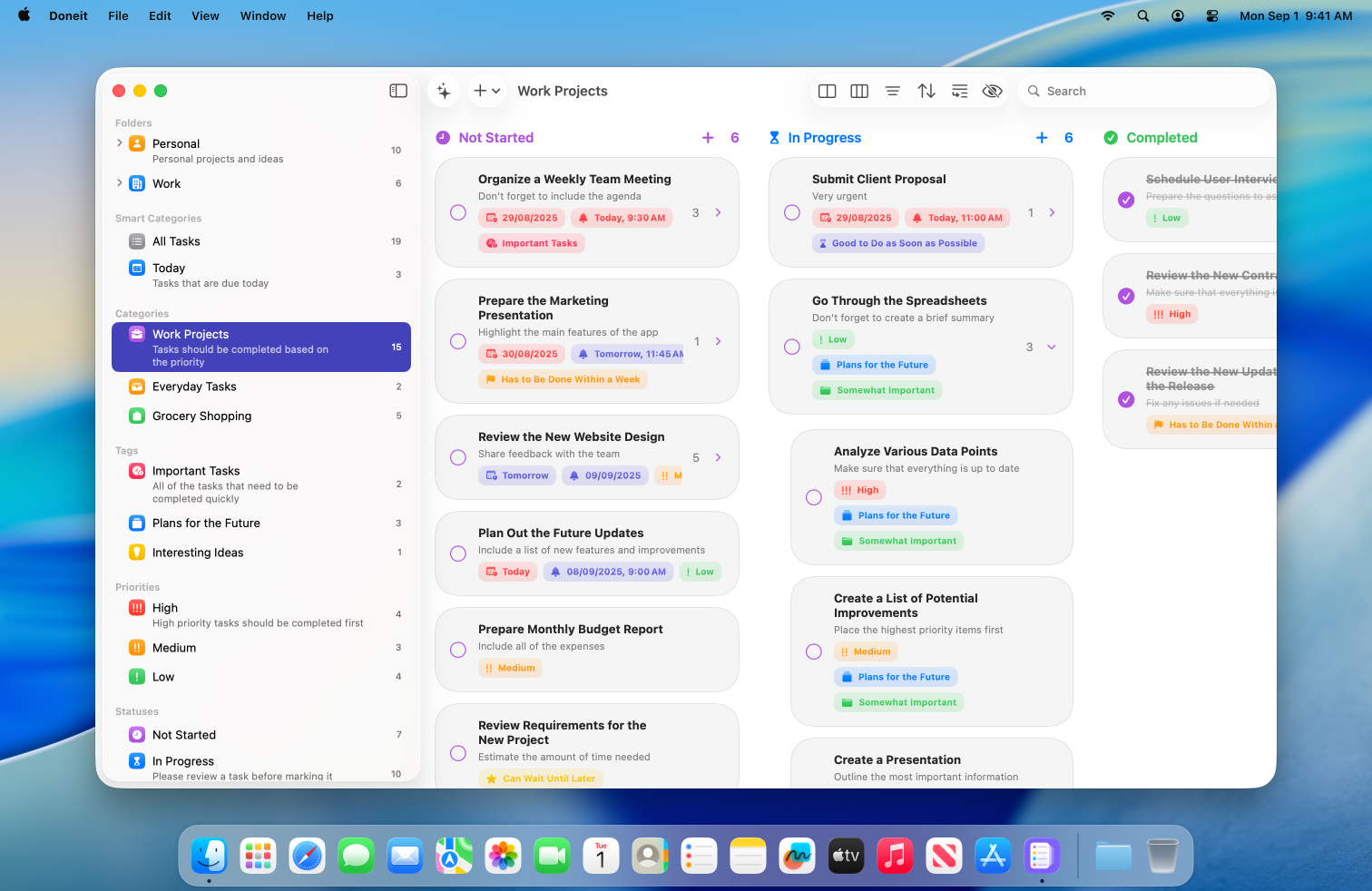
Doneit on BundleHunt is built around one idea: capture a task without leaving what you're doing. The Assist popup — triggered by a global hotkey from anywhere on the Mac — gives you a single field. Type the task, hit Return, and you're back in whatever app you were using.
Behind the capture popup, Doneit has lists, tags, due dates, recurrence rules, and a board view (shown above) for visual thinkers who want to drag tasks between columns. But those features stay out of sight until you ask for them. The app opens fast and stays out of your way — which is the entire point when your friction is capture speed, not organization.
Doneit is separate from iCloud Reminders, so it can coexist with your existing Reminders lists — family grocery list stays untouched, work capture goes to Doneit. Check the current storage model, sync behavior, pricing, and license terms on the deal page before using it for sensitive or commercial work.
Good for: anyone who repeatedly loses tasks during app-switching. Writers, developers, designers mid-flow. Not for: people who need cross-device sync to iPhone — Doneit is Mac-only.
Full feature list
Vendor-stated capability areas include global hotkey task capture, board-style organization, due dates, recurring tasks, calendar-related workflows, and menu bar access. Confirm storage, sync, and license details before purchase.
Disclosure: BundleHunt sells this; we earn a commission.
Creativit — best Mac to-do app for project structure
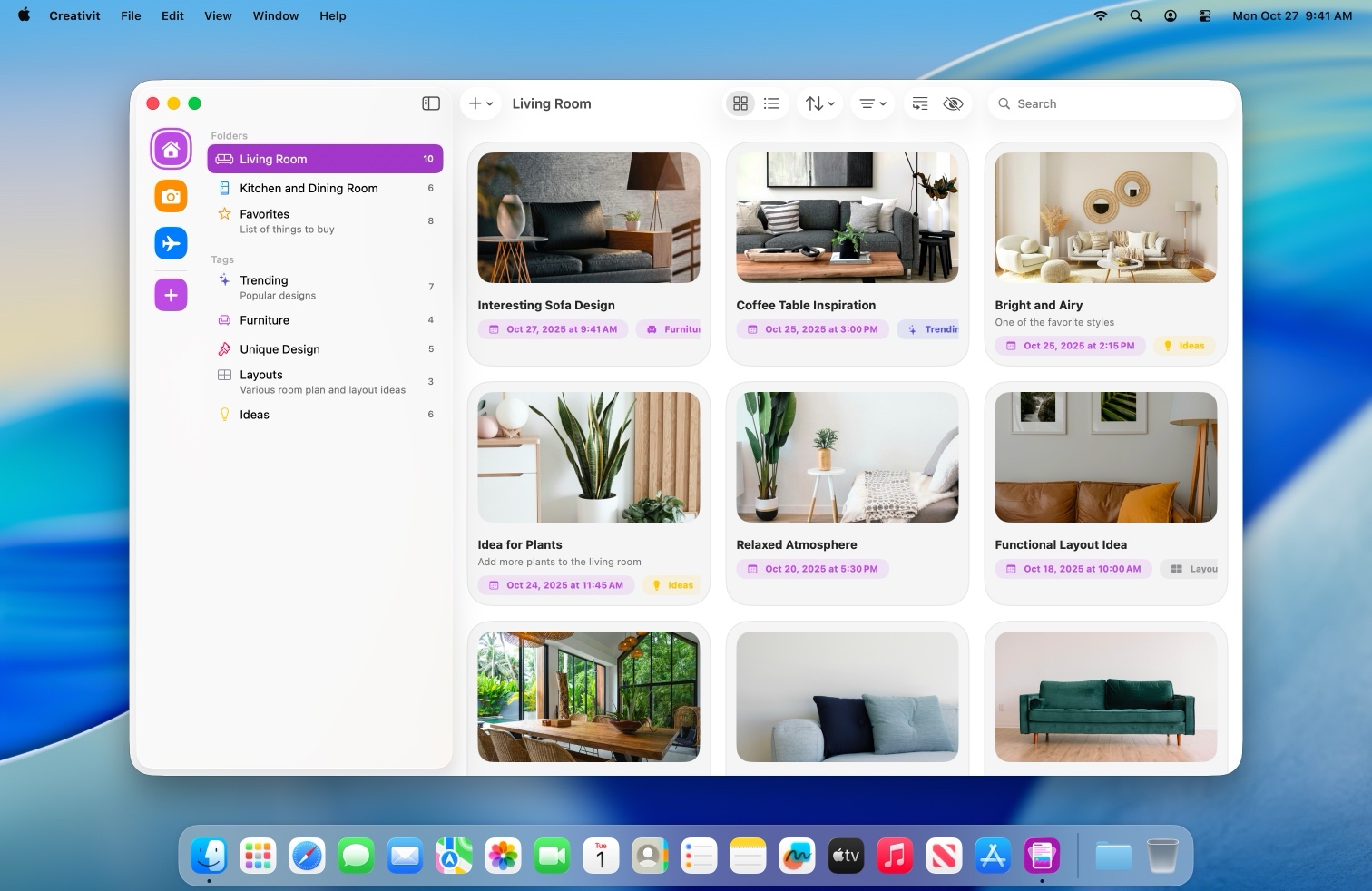
Creativit on BundleHunt treats work as projects, not items. Create a project, add sections (Research, Draft, Review, Ship), drop tasks under each section, reorder freely. The structure in the screenshot above is what Reminders can't do — multi-level organization where each project has its own set of grouped, ordered tasks.
Creativit is a native Mac app built around solo project structure rather than team workspaces. You open it, create a project, add sections and tasks, and start working. Check the current storage model, sync behavior, pricing, and license terms on the deal page before using it for sensitive or commercial work.
The right pick when you're juggling more than two parallel multi-step projects and Reminders' single-level subtasks aren't cutting it. If your projects are simple (a flat list of checkboxes), Creativit is more structure than you need — stay on Reminders.
Good for: freelancers, solo founders, anyone managing multiple projects with distinct phases. Not for: teams who need shared boards or real-time collaboration — Creativit is a solo tool.
Full feature list
Vendor-stated capability areas include project-based task organization, sections, drag-and-drop task reordering, and native Mac workflows. Confirm storage, sync, and license details before purchase.
Disclosure: BundleHunt sells this; we earn a commission.
A few common questions
To-do app questions almost always reduce to one comparison: Doneit vs Creativit. Capture speed vs. project structure — pick the failure mode that fires first in your week.
What's the real difference between Doneit and Creativit? Doneit optimizes for speed of capture — get the task out of your head with less app-switching friction. Creativit optimizes for structure of work — organize multi-step projects with sections and ordering. Some people use both: Doneit to capture, Creativit to organize.
Where does my data live? Apple Reminders syncs through iCloud. Doneit and Creativit keep data in their own local app storage; neither touches your iCloud Reminders database. This means they coexist cleanly — your family shared lists stay in Reminders, your work capture goes wherever you put it.
Are they signed and notarized? Check the current developer page and download source at purchase time. If Gatekeeper warns on first launch, use right-click → Open only after confirming the app came from the expected source.
Why not Notion or Obsidian for tasks?
They're workspace apps with a task view bolted on. Setup takes hours, capture is slow (open the app, find the page, create the block, type the task). A purpose-built to-do app should open in under a second and capture in under two. If your real need is notes with task checkboxes, the notes apps roundup is a better starting point.
What about Things 3, TickTick, Todoist?
Things 3 is a polished native Mac task manager sold outside BundleHunt. We don't sell it. TickTick and Todoist are cross-platform subscription-style options; consider one if you need Windows or Android alongside Mac. Those alternatives do not change this page's framework: Doneit is relevant for capture friction, Creativit for solo project structure.
Related reading
- Best Mac Productivity Apps in 2026 — the pillar
- Best Mac Notes Apps in 2026
- Best Mac Dock Apps in 2026
Sources
- Apple Support: Use Reminders on Mac
- Apple Support: Spotlight on Mac
- Apple Support: Use Siri on Mac
- Doneit and Creativit product pages on BundleHunt. Re-check current product capabilities, pricing, storage, and sync behavior during each scheduled content review.
Last reviewed 2026-05-17.